 Wee Hours
Your hands are full. Just say it.
Wee Hours logs feeds, diapers and sleep by voice, tap, Apple Watch or smart glasses. Your partner sees it at once, so at 3 a.m. nobody has to ask when she last ate.
For iPhone and Apple Watch. Tap logging is free, always.
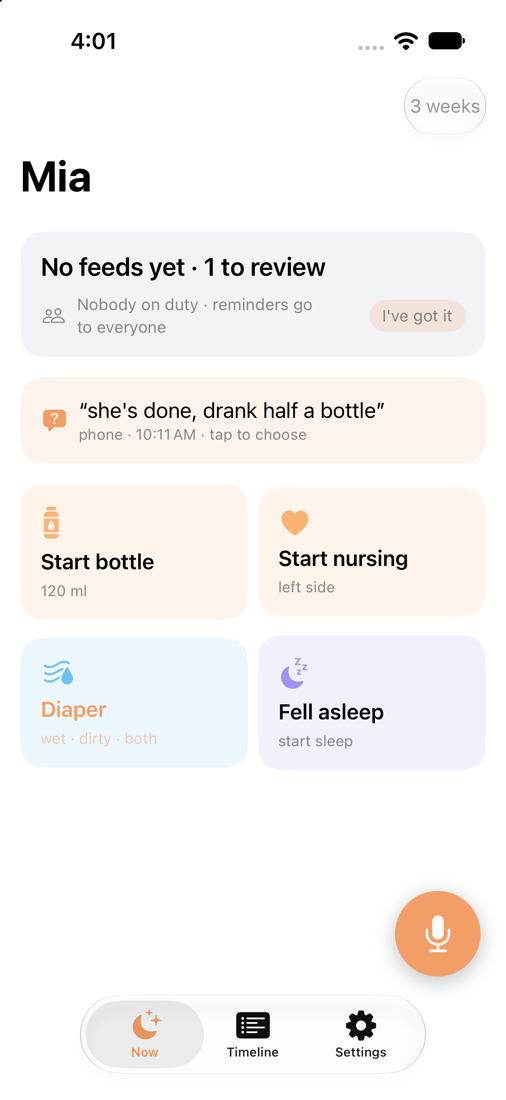
Say it the way you'd say it to your partner
No forms and no menus. Hold the mic and talk. Times, amounts and sides are understood, and anything unclear waits for a single tap.
And every surface shows the same one line:
Whatever is free, a hand, a wrist or your voice
Voice, on your phone
Hold the floating mic from any screen. Speech recognition and understanding both run on the iPhone, and the audio never leaves it.
One tap
Big tiles for start bottle, nursing, diaper and sleep. They change with what's happening, so "Finish bottle" appears while one is going.
Apple Watch
Speak or tap from your wrist while you're holding the baby. The phone does the processing.
Widgets, Siri and the Action Button
Log from the Lock Screen or with a press of the Action Button, and follow a running feed in a Live Activity.
Even G2 glasses and R1 ring
See the status line in your field of view, and log with a ring gesture without touching anything.
Your own AI assistant
Claude, ChatGPT and other assistants can read the log, and add to it if you allow, over MCP. Set it up.
One log for the whole household
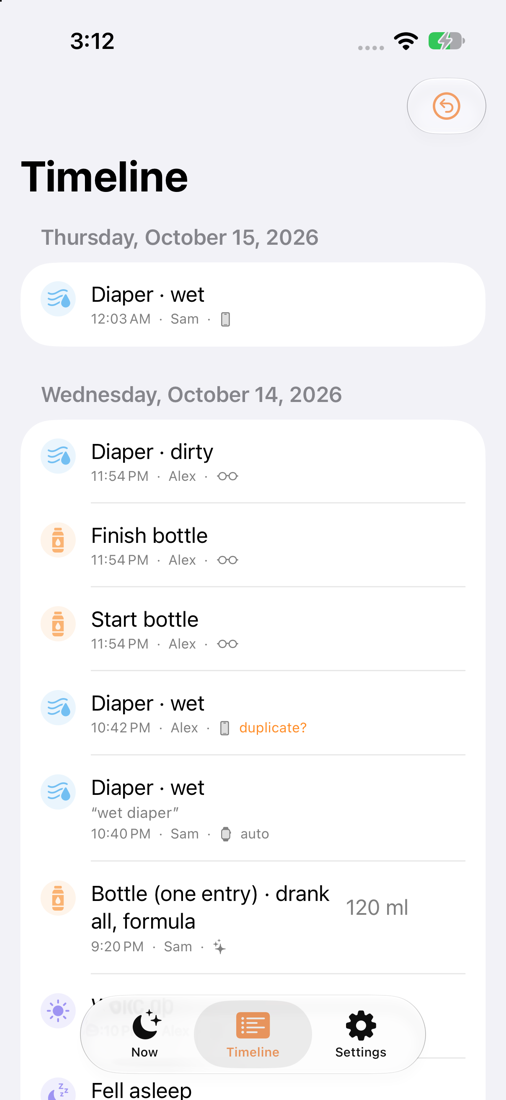
Both parents, a grandparent or a night nurse log into the same timeline and see the same status.
- On duty. Say who has the baby tonight, and reminders go to that person instead of waking you both.
- Duplicates caught. If you both log the same diaper, Wee Hours flags it and you merge with one tap.
- Corrections, not overwrites. Undo and edits are recorded as new entries, so the history stays honest.
- One purchase covers everyone in the household.
A glance, not a phone screen
With Even Realities G2 glasses, the status sits quietly in view. A ring gesture starts a feed. Hold to speak, and a phone in your household processes it later.
Bottle started
Your log, your assistant
Wee Hours records what happened and stops there: it doesn't diagnose or nag. When you want patterns, totals or a summary for the pediatrician, ask the AI assistant you already use. It reads your log through MCP, with your permission.
Connect an assistantYour baby's data stays yours
- Voice is processed on your iPhone. We run no speech or AI servers, and recordings from the phone and watch are never uploaded.
- No ads and no tracking. We don't sell data, and the app has no advertising or analytics SDKs.
- No account required. Use it on one phone with no sign-in, and add your partner later if you want sync.
- Leave any time. Delete your household's data with one tap, from the app or from your account page.
Free to log. Plus for hands-free.
Every household starts with a 14-day trial of Plus. After that, tap logging stays free, so you never lose access to your own log.
Free
- Tap logging and timeline
- Partner sync
- Widgets and Siri
Plus monthly
Plus yearly
Plus lifetime
Plus includes
- Voice logging with the on-device model
- Apple Watch, Even G2 glasses and R1 ring
- Reminders for whoever is on duty
- Your AI assistant over MCP
- CSV export
Prices in USD and may vary by region. One purchase covers the whole household. Subscriptions are billed through the App Store.
Questions
Does it work without internet?
Yes. Voice and tap logging work offline on the phone, and entries sync when you're back online.
Does my partner need their own subscription?
No. One purchase covers everyone in the household. Your partner joins with an invite code from Settings.
What if it mishears me?
When it's sure, the entry is logged and you get a few seconds to undo. When it isn't, it shows its top guesses and you pick one with a tap. It never guesses quietly.
Is there an Android app?
Not yet. Android is planned. Until then, a partner on Android can follow the log through a connected AI assistant.
Does Wee Hours give medical advice?
No. Wee Hours records what happened. For questions about your baby's health, talk to your pediatrician.
More answers on the support page.